|
|

|
Creating Lara Outfits Page 14 |
| Page 1
- 2
- 3
- 4
- 5
- 6
- 7
- 8
- 9
- 10
- 11
- 12
- 13
- 14
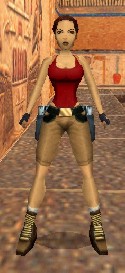
Our Final Check for This Tutorial Use the Windows Explorer to copy all of the files in your "Laras Closet\Preview" folder to your "trle\graphics\wads" folder. Then boot your Level Editor and load the "tut1_starter.PRJ" file. Output the "tut1" wad as normal and then use the Level Convertor program to build the "tut1" level. Start the Level Editor game and load the "Playable Tutorial Level." Hop on to the back ledge and take a look at Lara in her long length pants. They still need to have a lot of work with blending and creating the wrinkles and even new cuffs. I'll leave up to you to do. Saving Your New Outfit To save this or any new outfit, simply copy your "tut1.WAD" file from your "Laras Closet\Preview" folder into your "Laras Closet\Outfits" folder and give it a unique name that helps you remember what the outfit is. Myself, I copied it there and named it "Tutorial.WAD."
In order to use your new outfits in your levels, you'll want to read our "Adding Outfits to Your Levels" tutorial. Use the link below. Cleaning House During this tutorial you've created a lot of files and many of them you wouldn't normally need again. Go back inside your "Laras Closet\Workspace" folder and delete any and all files that you won't be needing again. In many cases this will be all of the files. If there are some files that you want to keep I would suggest keeping them somewhere else and maintaining this folder as a scratchpad for your work. Final Notes Remember, the "Laras Closet\Original" folder contains the "tut1" original files. Whenever you want to put things back as they were, simply copy all of the files in this folder back into your "trle\graphics\wads" folder. You'll still need to load and build this level again. Well, I hope you've found this tutorial somewhat interesting and I hope it gets you on your way to creating many new and interesting outfits for Lara. If you'd like to share these new outfits with others, remember you can go to our submissions area and submit them there. Have fun!
|